Introduction
The Ultimate ChatGPT Guide is designed for beginners and professionals alike.
Imagine being able to ask a computer almost anything—whether it’s explaining quantum physics in simple words, writing a professional email, debugging code, planning a vacation, creating a marketing strategy, or helping you brainstorm your next big idea—and receiving a thoughtful response in seconds.
Just a few years ago, that sounded like science fiction.
Today, it’s a reality.
At the heart of this transformation is ChatGPT, an artificial intelligence assistant that has fundamentally changed how people interact with technology. What began as an experimental conversational AI has quickly evolved into one of the world’s most widely used digital tools, helping millions of people learn faster, work smarter, and solve problems more efficiently.
Students use ChatGPT to understand difficult concepts. Developers rely on it to write and debug code. Businesses automate repetitive tasks and improve customer support. Writers overcome creative blocks, marketers generate campaigns, researchers summarize complex information, and entrepreneurs explore new ideas—all through natural conversations with AI.
Yet despite its enormous popularity, ChatGPT is also one of the most misunderstood technologies of our time.
Many people know what it can do, but far fewer understand how it actually works, where its knowledge comes from, what its limitations are, or how to use it effectively. Others wonder whether ChatGPT is truly reliable, whether it protects their privacy, how it compares to competing AI assistants, or whether a paid subscription is worth the investment.
Unfortunately, most online articles answer only a small piece of that puzzle. They provide a brief definition, list a few features, and leave readers searching elsewhere for the complete picture.
This guide was created to be different.
Rather than offering a quick introduction, this is a comprehensive resource designed to help you understand ChatGPT from every important angle. Whether you’re discovering AI for the first time or looking to unlock advanced capabilities, you’ll find clear explanations, practical examples, honest insights, and real-world advice throughout this guide.
You’ll learn what ChatGPT is, how it works behind the scenes, how different GPT models compare, which subscription plan best fits your needs, how to write better prompts, how businesses use AI every day, where ChatGPT excels, where it falls short, and how to use it responsibly and effectively.
Artificial intelligence is changing the way we live and work at an extraordinary pace. Understanding ChatGPT is no longer just an advantage—it is rapidly becoming an essential digital skill.
If you’re looking for a guide that goes beyond the basics and helps you truly master one of the most influential AI tools ever created, you’ve come to the right place.
Let’s begin with the most important question: What exactly is ChatGPT?
What Is ChatGPT?
To learn more about ChatGPT and its latest features, visit the official OpenAI website.
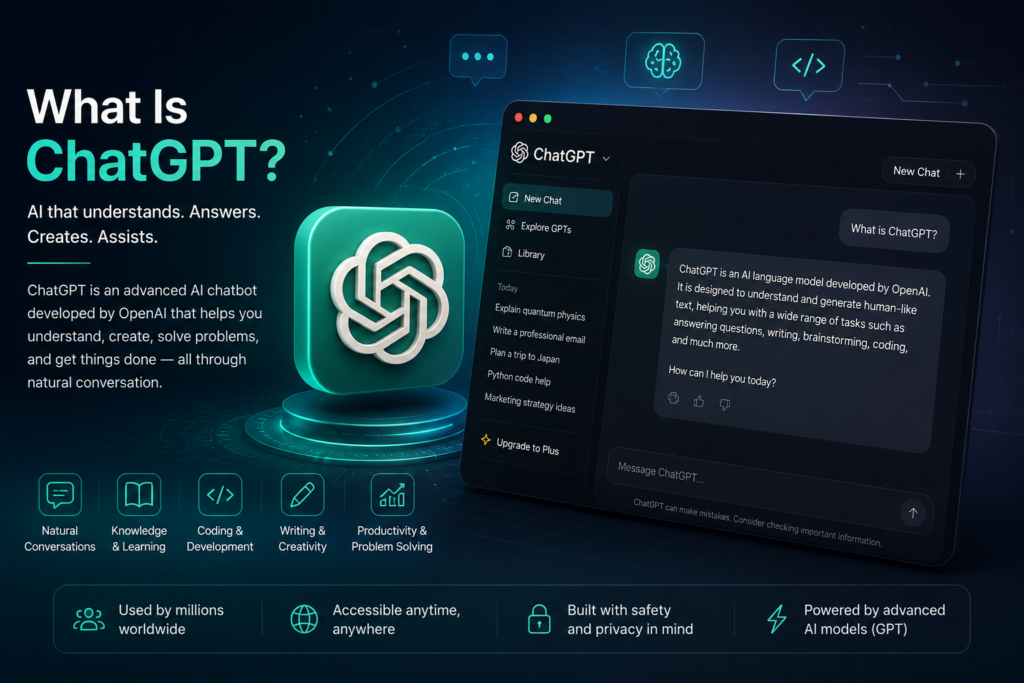
ChatGPT is an advanced artificial intelligence chatbot developed by OpenAI that understands and generates human-like text through natural conversations. Unlike traditional software that follows fixed commands or search engines that simply display existing web pages, ChatGPT can understand context, answer questions, generate original content, solve problems, and assist with a wide variety of tasks in real time.
At its core, ChatGPT is powered by a family of AI models known as Generative Pre-trained Transformers (GPT). These large language models are trained on vast amounts of text from books, articles, publicly available websites, licensed data, and other educational sources. Rather than memorizing information like a database, ChatGPT learns patterns, language structures, reasoning techniques, and relationships between words, allowing it to generate responses that feel natural and conversational.
One of the biggest reasons behind ChatGPT’s success is its versatility. It is not designed for just one specific task. Instead, it acts as a general-purpose AI assistant capable of helping users across countless fields. Whether you need to write an email, summarize a research paper, create marketing content, explain a difficult scientific concept, generate programming code, translate languages, or brainstorm creative ideas, ChatGPT can adapt to your request within seconds.
Unlike a standard search engine, ChatGPT doesn’t simply provide a list of links. Instead, it creates personalized responses based on your prompt and remembers the context of the conversation, making follow-up questions feel natural. This conversational experience allows users to explore complex topics step by step without constantly starting over.
Today, millions of people—including students, teachers, software developers, researchers, business owners, marketers, designers, writers, healthcare professionals, and entrepreneurs—use ChatGPT to increase productivity, improve learning, automate repetitive work, and accelerate creative thinking. As AI technology continues to evolve, ChatGPT has become much more than a chatbot; it is now a comprehensive productivity platform used across education, business, software development, content creation, customer service, and many other industries.
However, it’s important to understand that ChatGPT is not perfect. Although it can generate highly useful and often accurate responses, it can occasionally make mistakes, misunderstand complex questions, or provide outdated information. For this reason, ChatGPT should be viewed as an intelligent assistant that supports human decision-making rather than replacing critical thinking or professional expertise.
Understanding what ChatGPT is—and recognizing both its capabilities and its limitations—is the first step toward using artificial intelligence effectively. In the next section, we’ll explore the story behind ChatGPT’s creation, the company that developed it, and how one AI assistant became one of the fastest-growing technologies in history.
Who Created ChatGPT?
ChatGPT was created by OpenAI, an artificial intelligence research and technology company founded in December 2015. The organization was established with an ambitious mission: to ensure that artificial general intelligence (AGI) benefits all of humanity rather than serving only a small group of individuals or organizations.
OpenAI was founded by a group of well-known entrepreneurs, researchers, and technology leaders who believed that artificial intelligence would become one of the most transformative technologies in human history. The founding team included Sam Altman, Elon Musk, Greg Brockman, Ilya Sutskever, Wojciech Zaremba, John Schulman, and several other prominent researchers and investors. Although Elon Musk left OpenAI’s board in 2018, the company continued its research independently under the leadership of Sam Altman.
During its early years, OpenAI focused primarily on AI research and published groundbreaking work in machine learning, robotics, reinforcement learning, and natural language processing. The organization released several increasingly powerful language models, including GPT-1 in 2018, GPT-2 in 2019, and GPT-3 in 2020. Each generation represented a significant leap in the model’s ability to understand and generate human language.
The breakthrough moment arrived on November 30, 2022, when OpenAI introduced ChatGPT to the public. Unlike previous AI models that were mainly available to researchers and developers, ChatGPT offered an easy-to-use conversational interface that anyone could access through a web browser. Within just a few days, millions of people began using the platform, making it one of the fastest-growing consumer applications ever released.
Since then, OpenAI has continued to improve ChatGPT by introducing more capable GPT models, multimodal features, voice conversations, image generation, memory, advanced reasoning capabilities, and productivity tools that extend far beyond simple text generation.
Today, OpenAI is recognized as one of the world’s leading AI companies. Through continuous research and rapid innovation, it has played a central role in bringing artificial intelligence into classrooms, businesses, software development, healthcare, scientific research, and everyday life.
Understanding the story behind OpenAI helps explain why ChatGPT has evolved so quickly—and why it continues to shape the future of artificial intelligence.
The Evolution of GPT Models
To understand why ChatGPT has become one of the most powerful AI assistants in the world, it’s important to explore the evolution of the GPT family of models. Each new generation introduced significant improvements in language understanding, reasoning, creativity, and real-world usability.
The journey began in 2018 with the release of GPT-1. Although relatively small by today’s standards, GPT-1 demonstrated that a transformer-based language model could generate coherent text after being trained on large amounts of data. It laid the foundation for everything that followed.
In 2019, OpenAI introduced GPT-2, a much larger and more capable model. GPT-2 attracted global attention because of its ability to generate highly realistic text. Initially, OpenAI chose not to release the full model immediately due to concerns about potential misuse, sparking worldwide discussions about AI safety and responsible development.
The next breakthrough came in 2020 with GPT-3. Containing 175 billion parameters, GPT-3 represented a dramatic leap in capability. It could write articles, answer complex questions, translate languages, generate programming code, and even produce creative stories with remarkable fluency. GPT-3 became the foundation for many AI-powered applications and introduced millions of developers to the possibilities of large language models.
Timeline of GPT Models
The table below summarizes the major milestones in the evolution of OpenAI’s GPT models and highlights how each generation introduced new capabilities.
| Model | Release | Major Improvement |
| GPT-1 | 2018 | First transformer language model |
| GPT-2 | 2019 | More natural text generation |
| GPT-3 | 2020 | 175B parameters, major breakthrough |
| ChatGPT | 2022 | Conversational AI for everyone |
| GPT-4 | 2023 | Better reasoning and accuracy |
| GPT-4o | 2024 | Multimodal AI (text, image, voice) |
Everything changed on November 30, 2022, when OpenAI launched ChatGPT. Instead of interacting with AI through complex APIs, users could simply type questions into a conversational interface. The simplicity of the experience, combined with the intelligence of the underlying GPT models, made ChatGPT one of the fastest-growing consumer applications in history.
OpenAI continued to improve the platform by releasing GPT-4 in 2023. Compared with GPT-3.5, GPT-4 demonstrated stronger reasoning abilities, better accuracy, improved creativity, and a significantly lower tendency to generate incorrect information. It quickly became the preferred model for professionals, businesses, researchers, and developers.
In 2024, OpenAI introduced GPT-4o, where the “o” stands for omni. This model expanded ChatGPT beyond text by enabling it to understand and generate content across multiple formats, including text, images, audio, and voice. GPT-4o also offered faster responses and a more natural conversational experience, making AI interactions feel closer to speaking with another person.
The GPT family continues to evolve rapidly. Newer models focus on deeper reasoning, improved reliability, enhanced multimodal capabilities, and greater efficiency. Rather than simply generating text, modern GPT models are becoming intelligent assistants capable of helping people solve increasingly complex problems across education, business, software development, healthcare, scientific research, and creative industries.
Each generation has moved artificial intelligence one step closer to becoming a practical tool for everyday life, transforming ChatGPT from a simple chatbot into one of the world’s most advanced AI productivity platforms.
How Does ChatGPT Work?
Artificial intelligence may seem mysterious, but the basic idea behind ChatGPT is easier to understand than many people think. Rather than searching the internet for answers or thinking like a human, ChatGPT works by recognizing patterns in language and predicting the most appropriate response based on the information it has learned during training.
Imagine reading millions of books, articles, research papers, conversations, and educational resources over many years. Instead of memorizing every sentence, you begin to understand how language works, how ideas connect, and how people typically communicate. ChatGPT follows a similar principle. It has been trained to recognize relationships between words, phrases, and concepts, allowing it to generate responses that sound natural and relevant.
When you type a message into ChatGPT, the process begins immediately. First, the AI analyzes your prompt to understand what you are asking. It considers the context of your conversation, identifies your intent, and determines what type of answer would be most helpful.
Next, the underlying GPT model processes your request using billions of learned language patterns. Instead of searching a database for a stored answer, it predicts the most likely sequence of words that should come next. This prediction happens extremely quickly, allowing ChatGPT to generate detailed responses within seconds.
How ChatGPT Processes Your Prompt
| Step | What Happens |
| User Prompt | You type a question, request, or instruction. |
| Context Analysis | ChatGPT analyzes your words and understands your intent. |
| Language Processing | The GPT model evaluates learned language patterns. |
| Response Generation | The AI generates the most appropriate response. |
| Continue Conversation | You ask follow-up questions naturally. |
Why Does ChatGPT Feel Like a Human Conversation?
ChatGPT feels natural because it has been trained to understand context rather than treating every question as a completely new request. During a conversation, it remembers the information you have already shared within the current chat and uses that context to produce more relevant, coherent, and personalized responses.
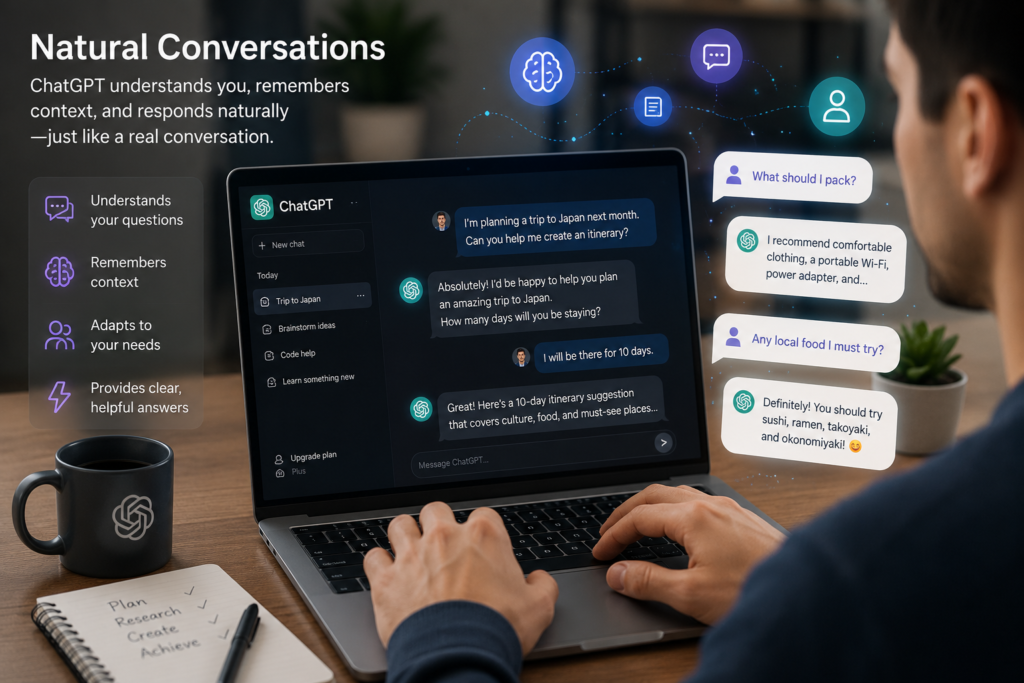
For example, if you first ask ChatGPT to help you plan a trip to Japan and later ask, “What should I pack?”, it understands that your second question refers to the trip you mentioned earlier. A traditional search engine would simply search for the words “What should I pack?” without fully understanding the previous conversation.
This ability to maintain context makes conversations feel smoother and more intuitive. Instead of repeating the same information again and again, users can ask follow-up questions, request changes, or explore topics in greater depth just as they would when speaking with another person.
However, it’s important to remember that ChatGPT is not conscious and does not possess emotions, opinions, or personal experiences. It generates responses by recognizing patterns in language rather than thinking or understanding the world in the same way humans do. While its conversational style feels remarkably natural, it remains an AI system built to predict and generate text based on learned patterns.
For this reason, ChatGPT should be viewed as an intelligent digital assistant rather than a replacement for human expertise. Used correctly, it can significantly improve productivity, creativity, learning, and problem-solving while still benefiting from human judgment and critical thinking.
Can ChatGPT Think Like Humans?
One of the most common misconceptions about ChatGPT is that it “thinks” like a human. While its responses often sound intelligent and conversational, the reality is very different.
Humans learn through personal experiences, emotions, observations, and conscious reasoning. We understand the world by interacting with it, making decisions, and reflecting on those experiences over time. ChatGPT, however, does not possess consciousness, emotions, beliefs, memories, or personal opinions.
Instead, ChatGPT generates responses by identifying patterns in language that it learned during training. It predicts the most appropriate sequence of words based on your prompt and the context of the conversation. This process can produce remarkably accurate and helpful answers, but it is fundamentally different from human thinking.
For example, if you ask ChatGPT to explain a scientific concept, write a poem, or generate computer code, it does not recall personal knowledge or experiences. Instead, it uses statistical patterns learned from enormous amounts of text to generate a response that is likely to be useful and relevant.
This distinction is important because it explains both ChatGPT’s greatest strengths and its limitations. While it can process information quickly, assist with complex tasks, and generate creative content, it can also make mistakes, misunderstand context, or produce inaccurate information. For this reason, users should always apply critical thinking and verify important facts when using AI-generated content.
Rather than replacing human intelligence, ChatGPT is best understood as a powerful digital assistant that complements human creativity, knowledge, and decision-making. When combined with human judgment, it becomes an exceptionally valuable tool for learning, productivity, and problem-solving.
Key Features of ChatGPT
ChatGPT has evolved far beyond a simple AI chatbot. What started as a conversational assistant is now a comprehensive AI platform that helps people write, research, code, analyze data, create images, brainstorm ideas, and automate everyday tasks.
One of the biggest reasons for ChatGPT’s popularity is the wide range of powerful features it offers. Whether you’re using the free version or a premium subscription, ChatGPT provides tools designed to improve productivity, creativity, and decision-making across almost every profession.
From students writing essays to developers building applications and businesses streamlining workflows, these features make ChatGPT one of the most versatile AI assistants available today.
In the following sections, we’ll explore the most important ChatGPT features, explain how they work, and show you when each one is most useful.
Natural Conversations
Unlike traditional search engines or rule-based chatbots, ChatGPT is designed to hold natural conversations. It understands follow-up questions, remembers the context of your discussion within the current chat, and adapts its responses based on your instructions.
This conversational ability allows users to ask complex questions step by step without repeating the entire context. Whether you’re solving a technical problem, learning a new subject, or planning a project, ChatGPT makes the interaction feel intuitive and human-like.
Instead of simply providing links, ChatGPT explains concepts, answers questions in plain language, and can adjust its tone depending on your needs. You can ask it to simplify difficult topics, rewrite responses, generate professional content, or explain ideas from different perspectives—all within the same conversation.
Memory
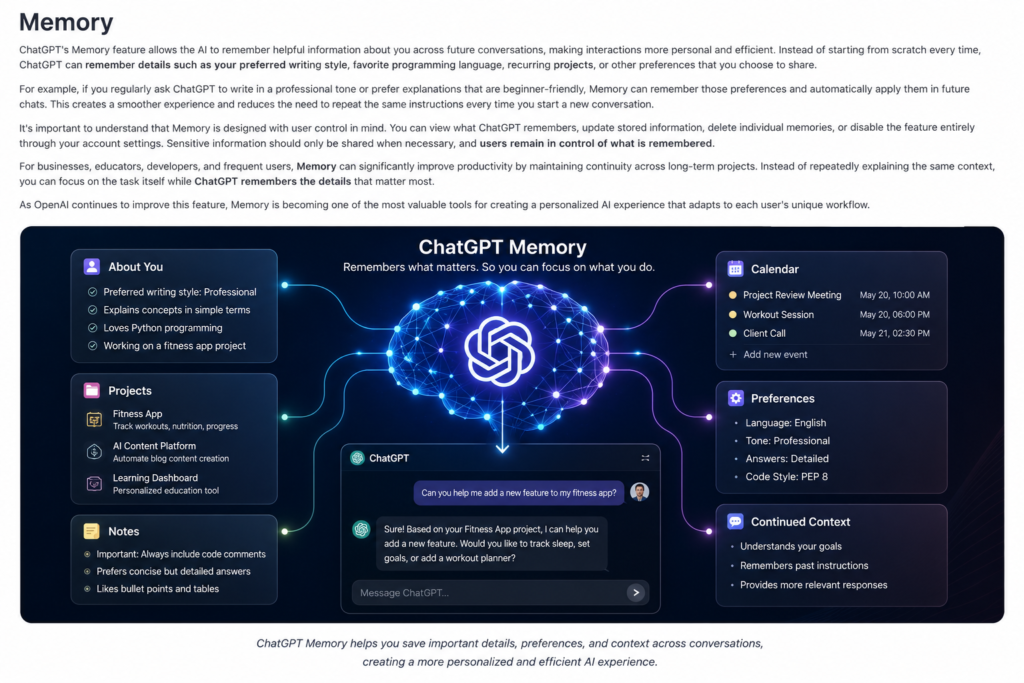
ChatGPT’s Memory feature allows the AI to remember helpful information about you across future conversations, making interactions more personal and efficient. Instead of starting from scratch every time, ChatGPT can remember details such as your preferred writing style, favorite programming language, recurring projects, or other preferences that you choose to share.
For example, if you regularly ask ChatGPT to write in a professional tone or prefer explanations that are beginner-friendly, Memory can remember those preferences and automatically apply them in future chats. This creates a smoother experience and reduces the need to repeat the same instructions every time you start a new conversation.
It’s important to understand that Memory is designed with user control in mind. You can view what ChatGPT remembers, update stored information, delete individual memories, or disable the feature entirely through your account settings. Sensitive information should only be shared when necessary, and users remain in control of what is remembered.
For businesses, educators, developers, and frequent users, Memory can significantly improve productivity by maintaining continuity across long-term projects. Instead of repeatedly explaining the same context, you can focus on the task itself while ChatGPT remembers the details that matter most.
As OpenAI continues to improve this feature, Memory is becoming one of the most valuable tools for creating a personalized AI experience that adapts to each user’s unique workflow.
Voice Mode
ChatGPT’s Voice Mode transforms the traditional chatbot experience into a natural, real-time conversation. Instead of typing every question, users can simply speak to ChatGPT and receive spoken responses, making interactions feel much more like talking to another person.
Powered by advanced speech recognition and natural language processing, Voice Mode can understand questions, maintain context throughout a conversation, and respond almost instantly. This creates a smoother and more engaging experience, especially when multitasking or using ChatGPT on a mobile device.
Voice Mode is particularly useful for practicing foreign languages, brainstorming ideas, preparing presentations, learning new subjects, or asking quick questions while driving, cooking, or working. Rather than stopping to type, users can continue the conversation naturally using only their voice.
One of the biggest advantages of Voice Mode is its ability to support longer, more dynamic discussions. Users can interrupt, ask follow-up questions, change topics, or request additional explanations without breaking the flow of the conversation.
As AI voice technology continues to improve, Voice Mode is becoming one of the most intuitive ways to interact with ChatGPT, bringing artificial intelligence closer to everyday human communication.
Image Generation
One of the most exciting capabilities of ChatGPT is Image Generation. Instead of describing an idea to a designer or searching through stock photo libraries, users can simply describe what they imagine in natural language, and ChatGPT can generate original images within seconds.
Whether you need a realistic photograph, digital artwork, logo concept, social media graphic, presentation illustration, marketing banner, or creative fantasy scene, ChatGPT can transform text descriptions into detailed visuals. Users can also refine generated images by requesting changes such as different colors, lighting, styles, backgrounds, or compositions without starting over.
Image Generation is especially valuable for content creators, marketers, designers, educators, entrepreneurs, and businesses that need professional visuals quickly. It significantly reduces the time required to create graphics while encouraging creativity through rapid experimentation.
Another major advantage is conversational editing. Instead of learning complex design software, users can simply tell ChatGPT what they want to change. For example, you might ask it to replace the background, adjust facial expressions, add new objects, improve lighting, or transform an illustration into a completely different artistic style.
Although AI image generation is incredibly powerful, users should always respect copyright, intellectual property rights, and ethical guidelines when creating or sharing AI-generated content. Responsible use helps ensure that these tools continue to benefit creators and businesses around the world.
File Uploads and Document Analysis
ChatGPT can also analyze uploaded files, making it far more than a simple chatbot. Users can upload documents, spreadsheets, presentations, PDFs, images, and other supported file types to receive detailed explanations, summaries, insights, or recommendations.
For example, students can upload research papers and ask for simplified explanations, businesses can analyze financial reports, developers can review source code, and professionals can summarize lengthy documents in just a few seconds.
Instead of reading hundreds of pages manually, users can ask specific questions about the uploaded content, identify key findings, compare information, extract important data, or generate reports based on the document.
This feature has become one of the most practical productivity tools available in ChatGPT, saving users significant time while making complex information easier to understand and work with.
Data Analysis
ChatGPT is capable of analyzing data, identifying patterns, and helping users make informed decisions from complex information. Instead of manually reviewing large amounts of data, users can ask ChatGPT to explain trends, summarize findings, compare values, or highlight unusual patterns in seconds.
For example, businesses can analyze sales reports, students can explore research data, marketers can evaluate campaign performance, and financial professionals can organize large datasets more efficiently. By asking targeted questions, users can gain meaningful insights without needing advanced technical knowledge.
When working with spreadsheets or structured datasets, ChatGPT can help interpret charts, explain calculations, organize information into tables, and suggest improvements based on the available data. While it should not replace professional statistical software for highly specialized analysis, it provides an excellent starting point for understanding complex information quickly.
As AI-powered analytics continue to improve, ChatGPT is becoming an increasingly valuable assistant for professionals who need to transform raw data into clear, actionable insights.
Canvas
Canvas is a collaborative workspace inside ChatGPT designed for longer writing projects, coding tasks, editing, and iterative improvements. Instead of generating a single response, Canvas provides a structured environment where users can develop ideas, revise documents, improve code, and organize content more efficiently.
For writers, Canvas makes it easier to draft articles, edit reports, or improve long-form content without constantly copying and pasting text between different applications. Developers can review code, fix bugs, and make changes while keeping the entire project organized in one place.
Because Canvas keeps both the conversation and the working document together, it creates a smoother workflow for projects that require multiple revisions. This makes it particularly useful for students, researchers, businesses, and professionals working on complex tasks.
Projects
ChatGPT Projects helps users organize related conversations, uploaded files, instructions, and ongoing work into dedicated workspaces. Instead of managing dozens of separate chats, Projects allows you to keep everything connected, making long-term tasks much easier to manage.
For example, a marketing team can create a project for a product launch, storing campaign ideas, content drafts, research documents, and meeting notes in one organized workspace. A student can build a project for a university thesis, while a software developer can keep coding discussions, documentation, and bug reports together.
Projects also improve productivity by maintaining context across multiple conversations. Rather than explaining the same project every time you start a new chat, ChatGPT can continue working within the same organized environment, saving time and improving consistency.
As AI becomes part of everyday work, Projects is evolving into one of ChatGPT’s most valuable productivity features for individuals, teams, and businesses managing complex workflows.
Custom GPTs
One of ChatGPT’s most innovative features is the ability to create Custom GPTs. Instead of using the default AI assistant for every task, users can build specialized versions of ChatGPT designed for specific goals, industries, or workflows.
A Custom GPT can be configured with its own instructions, preferred tone, knowledge sources, conversation style, and capabilities. For example, a company can create a customer support assistant, a teacher can build an educational tutor, a developer can create a programming expert, and a marketing agency can design an AI specialized in content creation.
The biggest advantage of Custom GPTs is consistency. Because they follow predefined instructions, they can deliver more focused and reliable responses for repetitive tasks. This saves time, improves efficiency, and creates a more personalized AI experience.
Even users with little or no programming experience can build Custom GPTs through ChatGPT’s intuitive interface, making advanced AI customization accessible to everyone.
Deep Research
Deep Research is one of ChatGPT’s most advanced capabilities, designed to help users explore complex topics in greater depth. Instead of providing a quick answer, this feature performs a more comprehensive investigation, organizes information, and presents structured findings that are easier to understand and evaluate.
Researchers, students, journalists, consultants, and business professionals can use Deep Research to explore unfamiliar subjects, compare viewpoints, identify key trends, and gather insights more efficiently. By combining reasoning with extensive information gathering, it supports more informed decision-making.
Rather than replacing critical thinking, Deep Research acts as an intelligent research assistant that helps users save time while navigating large amounts of information. For complex projects that require detailed analysis, it represents one of the most valuable AI-powered productivity tools currently available.
ChatGPT Search
ChatGPT Search combines conversational AI with access to current web information, allowing users to receive answers that are both natural and up to date. Instead of browsing through multiple websites, users can ask questions in everyday language and receive clear, summarized responses with supporting sources when available.
This feature is especially useful for researching recent news, comparing products, checking live information, learning about new technologies, or finding reliable explanations without manually searching through dozens of search results.
Unlike traditional search engines that primarily return lists of links, ChatGPT Search focuses on delivering direct answers while still encouraging users to explore trusted sources for additional context when needed. This makes researching faster, more interactive, and easier for both beginners and professionals.
ChatGPT Pricing
One of the first questions new users ask is surprisingly simple:
“Do I really need to pay for ChatGPT?”
The answer depends entirely on how you plan to use it.
For some people, the free version offers everything they need. Others rely on ChatGPT every day for work, software development, research, content creation, or business operations, making a paid subscription a worthwhile investment.
Instead of simply comparing prices, it’s more useful to understand what each plan is designed for, who should choose it, and whether paying for additional features will genuinely improve your workflow.
In this section, we’ll compare every ChatGPT plan, explain the differences between them, and help you decide which option provides the best value for your specific needs.
ChatGPT Plans at a Glance
| Plan | Best For | Monthly Cost | Recommendation |
|---|---|---|---|
| Free | Casual users and beginners | Free | ⭐⭐⭐⭐☆ |
| Go | Everyday users who want more access | Low-cost | ⭐⭐⭐⭐☆ |
| Plus | Professionals and creators | Mid-range | ⭐⭐⭐⭐⭐ |
| Pro | Power users and advanced AI workflows | Premium | ⭐⭐⭐⭐⭐ |
| Business | Teams and organizations | Custom | ⭐⭐⭐⭐⭐ |
| Enterprise | Large companies | Custom | ⭐⭐⭐⭐⭐ |
Quick Recommendation: If you’re just getting started, the Free plan is an excellent way to explore ChatGPT. However, professionals who use AI daily will usually benefit from upgrading to a paid plan for faster performance, access to more advanced models, and additional productivity features.
Free Plan
For many users, the Free Plan is the perfect starting point. It allows anyone to experience ChatGPT without paying a subscription fee, making artificial intelligence accessible to students, hobbyists, and curious beginners around the world.
Even without a paid subscription, the Free Plan offers impressive capabilities. Users can ask questions, write articles, summarize documents, brainstorm ideas, translate text, solve programming problems, and receive help with everyday tasks. For occasional use, these features are often more than enough.
However, free users should also be aware of certain limitations. During periods of high demand, response times may become slower, access to the most advanced AI models can be limited, and some premium features are either unavailable or offered with usage restrictions.
Best For
- Students exploring AI
- Casual everyday users
- Homework assistance
- Learning and education
- Occasional writing tasks
Pros
- Completely free to use
- Easy to get started
- Excellent for learning
- Suitable for everyday questions
Cons
- Limited access to advanced models
- Usage limits during busy periods
- Some premium features unavailable
💡 Editor’s Recommendation
If you’re completely new to ChatGPT, start with the Free Plan. Spend a few weeks learning how to write effective prompts and explore its core features. Once AI becomes part of your daily workflow, upgrading to a paid plan will feel much more valuable because you’ll know exactly which additional features you need.
ChatGPT Go
The ChatGPT Go plan is designed for users who have outgrown the Free Plan but do not require the full range of premium capabilities offered by higher-tier subscriptions. It provides a balanced experience by offering increased access, fewer usage restrictions, and a smoother overall workflow at an affordable price.
For people who use ChatGPT regularly for studying, writing, brainstorming, or everyday productivity, the Go plan offers noticeable improvements over the free experience. Conversations are generally more consistent, access to AI features is less restricted, and users can spend more time focusing on their work instead of worrying about usage limits.
While the Go plan is not intended for heavy professional workloads, it serves as an excellent middle ground for users who interact with AI several times a week and want a more reliable experience without paying for advanced enterprise-level features.
Best For
- Everyday AI users
- University students
- Freelancers
- Content writers
- People who use ChatGPT several times a week
Pros
- More generous usage limits than the Free Plan
- Smoother day-to-day experience
- Affordable monthly subscription
- Great value for regular users
Cons
- Fewer advanced capabilities than higher-tier plans
- Not designed for intensive professional workloads
- Some premium tools may still have limitations
💡 Editor’s Recommendation
If you find yourself opening ChatGPT almost every day but don’t need the most advanced professional features, the Go plan offers one of the best price-to-value ratios. It provides a noticeable upgrade over the Free Plan while remaining budget-friendly for students, freelancers, and everyday users.
⭐ Editor’s Rating
⭐⭐⭐⭐☆ (4.5/5)
Verdict: A smart upgrade for regular users who want a smoother AI experience without paying for the highest-tier plans.
ChatGPT Plus
For most users, ChatGPT Plus represents the best balance between price and performance. It is designed for people who rely on AI every day and want access to faster responses, more advanced models, and a richer set of productivity features.
Whether you’re a content creator, software developer, marketer, student, researcher, or entrepreneur, the Plus plan unlocks a significantly more capable AI experience than the free tier. Users typically benefit from improved response quality, priority access during busy periods, and support for advanced features that can dramatically improve daily workflows.
One of the biggest advantages of ChatGPT Plus is consistency. If AI has become part of your work routine, having reliable access to more capable models can save hours each week. Tasks such as writing long-form articles, analyzing documents, generating code, brainstorming business ideas, or learning complex topics become faster and more efficient.
For many professionals, the subscription quickly pays for itself through the time it saves. Even if it helps you complete just one extra task each day, the productivity gains often outweigh the monthly cost.
Best For
- Content creators
- Software developers
- Digital marketers
- University students
- Researchers
- Freelancers
- Small business owners
Pros
- Access to more advanced AI models
- Faster response times
- Better performance during peak hours
- More productivity tools and capabilities
- Excellent balance between cost and features
Cons
- Monthly subscription required
- Casual users may not need every premium feature
💡 Editor’s Recommendation
If you use ChatGPT for work, study, or content creation several times a week, ChatGPT Plus is the plan I recommend first. It offers the strongest balance of performance, features, and affordability, making it the best choice for the vast majority of users.
⭐ Editor’s Rating
⭐⭐⭐⭐⭐ (5.0/5)
Verdict: The best overall value for most users. If you’re serious about using AI regularly, this is the subscription that delivers the highest return on your investment.
How to Use ChatGPT Effectively
Knowing what ChatGPT is is only the first step. The real difference comes from knowing how to use it effectively.
Many people try ChatGPT once or twice, ask a few simple questions, and assume they’ve experienced everything the platform has to offer. In reality, the quality of ChatGPT’s answers depends heavily on the quality of your instructions.
Think of ChatGPT as a highly skilled professional rather than a search engine. The more clearly you explain your goal, provide context, and describe the type of answer you expect, the better the results will be.
The following techniques will help you get more accurate, detailed, and useful responses regardless of whether you’re a student, developer, business owner, researcher, or casual user.
Write Clear and Specific Prompts
The biggest mistake beginners make is writing prompts that are too short or too vague.
Instead of asking:
“Write an article.”
Try asking:
“Write a 1,500-word beginner-friendly article about renewable energy in a professional yet conversational tone. Include headings, practical examples, and a conclusion.”
Notice the difference.
The second prompt tells ChatGPT exactly what you want, who the audience is, how long the article should be, and what writing style to follow. The more context you provide, the better the response becomes.
A useful rule is to imagine you’re briefing a professional colleague. If your instructions would be clear to another person, they’ll usually be clear to ChatGPT as well.
Poor Prompt vs Great Prompt
| Poor Prompt | Better Prompt |
|---|---|
| Write an email. | Write a polite email to a client explaining a one-week project delay while maintaining a professional tone. |
| Explain AI. | Explain artificial intelligence to a 12-year-old using simple language and everyday examples. |
| Write code. | Write a Python program that reads a CSV file and calculates the average value for each column. |
Pro Tip: The more context you provide, the better ChatGPT performs. Think about your goal, your audience, the desired tone, and the format before writing your prompt.
Give ChatGPT Context
Imagine calling a doctor and saying only:
“Help me.”
The doctor would immediately start asking questions.
- What happened?
- Where does it hurt?
- How long have you been feeling this way?
- Do you have any medical history?
Without enough context, even the world’s best doctor cannot give the right advice.
ChatGPT works exactly the same way.
The more background information you provide, the more accurate, relevant, and useful its responses become. Instead of expecting the AI to guess what you need, tell it who you are, what you’re trying to achieve, who the audience is, and what kind of result you’re looking for.
For example, if you simply write:
“Write a blog post.”
ChatGPT has very little information to work with.
However, if you write:
“I own a technology website that publishes long-form SEO articles for beginners. Write a 2,000-word guide about artificial intelligence using a friendly but professional tone. Include headings, examples, comparison tables, and a conclusion.”
the AI immediately understands your objective and produces a much higher-quality response.
Providing context is especially important when you’re working on professional tasks such as content creation, software development, marketing campaigns, business planning, education, or research. A few extra sentences in your prompt can dramatically improve the quality of the final result.
Without Context vs With Context
| Without Context | With Context |
|---|---|
| Write an article. | Write a 2,000-word SEO article about renewable energy for beginners using a professional but easy-to-read tone. |
| Help me study. | Create a 30-day study plan for a university student preparing for a biology exam. |
| Write code. | Build a responsive HTML and CSS landing page for a technology startup with a modern design. |
💡 Expert Tip: Before pressing Enter, ask yourself: “Have I given ChatGPT enough information to understand exactly what I want?” Spending an extra 30 seconds adding context can save you several minutes of revisions later.
Refine the Conversation Instead of Starting Over
One of the biggest mistakes new ChatGPT users make is starting a brand-new conversation every time the AI gives an imperfect answer.
In reality, ChatGPT performs much better when you continue the conversation instead of abandoning it.
Think about working with a professional designer. If the first draft of a logo isn’t exactly what you imagined, you wouldn’t hire a different designer immediately. Instead, you would provide feedback such as:
- “Can you make it more modern?”
- “Use darker colors.”
- “Make the text larger.”
- “Try a minimalist style.”
The same principle applies to ChatGPT.
Instead of writing a completely new prompt, simply explain what you’d like to improve. You can ask ChatGPT to shorten the answer, add more examples, simplify technical language, change the writing style, or rewrite the response for a different audience.
This iterative approach allows the AI to build on previous responses, understand your preferences, and gradually produce a result that matches your expectations.
Many experienced users rarely accept the first response they receive. Instead, they treat ChatGPT as a collaborative assistant, refining ideas through multiple rounds of feedback until the output is exactly what they need.
Learning to improve a conversation rather than restarting it is one of the fastest ways to become a more effective ChatGPT user.
First Prompt vs Refined Prompt
| First Prompt | Refined Prompt |
|---|---|
| Write an article about AI. | Rewrite the article using simpler language, add real-world examples, and include a comparison table. |
| Create a logo idea. | Keep the same concept but use a minimalist style with blue and white colors. |
| Explain blockchain. | Explain blockchain as if you’re teaching a 15-year-old student, using simple analogies. |
💡 Expert Tip: Your first prompt doesn’t have to be perfect. Think of ChatGPT as a collaborator—each follow-up instruction helps shape a better final result.
ChatGPT Pro
The ChatGPT Pro plan is designed for professionals and power users who rely on AI every day for demanding tasks. It offers expanded usage limits, priority access to OpenAI’s most advanced models, and premium tools that support complex workflows.
If your work involves software development, large-scale content creation, data analysis, scientific research, or business strategy, the Pro plan can significantly improve both speed and productivity. Heavy users benefit from fewer interruptions, greater flexibility, and access to advanced capabilities that are not available in lower-tier plans.
Although it comes with a higher monthly cost, the Pro plan is aimed at users who view AI as a core part of their daily work rather than an occasional assistant.
Best For
- AI professionals
- Software developers
- Researchers
- Large content creators
- Power users
Pros
- Higher usage limits
- Access to advanced AI capabilities
- Excellent performance for intensive workloads
- Priority access during peak demand
Cons
- Higher subscription cost
- More features than most casual users need
💡 Editor’s Recommendation
If ChatGPT saves you hours every week and has become an essential part of your workflow, the Pro plan can easily justify its cost through increased productivity.
⭐ Editor’s Rating
⭐⭐⭐⭐⭐ (5.0/5)
Verdict: Built for professionals who depend on AI every single day.
ChatGPT Business
The ChatGPT Business plan is built for teams that want to use AI securely and collaboratively. Instead of individual subscriptions, it provides a shared workspace where employees can work together, manage projects, and access advanced AI tools under one account.
Business users benefit from stronger privacy controls, centralized administration, collaboration features, and higher usage limits. This makes the plan ideal for marketing teams, software companies, consulting firms, customer support departments, and organizations that use AI across multiple employees.
Another major advantage is improved workspace management. Administrators can manage team access, organize projects, and ensure company data is handled according to business policies, making AI adoption easier and more secure.
Best For
- Small and medium-sized businesses
- Marketing agencies
- Software teams
- Consulting firms
- Customer support teams
Pros
- Team collaboration features
- Shared workspace
- Stronger privacy controls
- Centralized administration
Cons
- Not necessary for individual users
- Higher cost than personal plans
💡 Editor’s Recommendation
If your team uses ChatGPT every day, the Business plan offers an excellent balance between collaboration, security, and productivity.
⭐ Editor’s Rating
⭐⭐⭐⭐⭐ (5.0/5)
Verdict: The best choice for teams that want to integrate AI into their daily workflow.
ChatGPT Enterprise
The ChatGPT Enterprise plan is designed for large organizations that require maximum security, scalability, and administrative control. It provides enterprise-grade AI capabilities while meeting the demanding privacy, compliance, and governance requirements of major businesses.
Enterprise customers benefit from advanced security features, dedicated support, expanded usage capacity, and tools that allow organizations to deploy AI across thousands of employees. The platform is built to integrate into existing business workflows while maintaining strict data protection standards.
Large enterprises often use ChatGPT to improve customer service, accelerate software development, analyze business data, automate internal processes, support employees, and increase overall productivity at scale.
Best For
- Large enterprises
- Global organizations
- Government agencies
- Financial institutions
- Healthcare organizations
Pros
- Enterprise-grade security
- Advanced administration tools
- Scalable AI deployment
- Dedicated support
- High reliability
Cons
- Not suitable for individual users
- Custom pricing
- Best suited for large organizations
💡 Editor’s Recommendation
If your organization requires advanced security, compliance, and company-wide AI adoption, ChatGPT Enterprise is the most comprehensive solution available.
⭐ Editor’s Rating
⭐⭐⭐⭐⭐ (5.0/5)
Verdict: The ultimate AI solution for organizations that require security, scalability, and enterprise-level management.
Which ChatGPT Plan Should You Choose?
Choosing the right ChatGPT plan depends on how often you use AI and what you expect it to help you accomplish.
If you’re just getting started, the Free Plan is an excellent way to explore ChatGPT without any financial commitment.
If you use ChatGPT regularly for studying, writing, or everyday productivity, the Go Plan offers a practical upgrade with fewer restrictions.
For most professionals, freelancers, creators, and developers, ChatGPT Plus provides the best overall balance between price, performance, and advanced features.
If AI plays a central role in your daily work and you need maximum performance, ChatGPT Pro is the ideal choice.
Businesses that want to collaborate securely should consider ChatGPT Business, while large organizations with strict security and compliance requirements will benefit most from ChatGPT Enterprise.
🏆 Editor’s Final Recommendation: For the vast majority of users, ChatGPT Plus offers the best value. It combines advanced capabilities, reliable performance, and a reasonable subscription cost, making it the plan we recommend most often.
ChatGPT vs Gemini vs Claude
Artificial intelligence has evolved rapidly, and ChatGPT is no longer the only powerful AI assistant available. Today, users can choose from several advanced platforms, each with its own strengths, limitations, and ideal use cases.
Among the most popular AI assistants are ChatGPT, Google Gemini, and Claude. While they all use large language models to understand and generate human-like responses, they differ in areas such as reasoning, coding, creativity, research capabilities, multimodal support, and ecosystem integration.
Rather than asking which AI is universally “the best,” a better question is:
Which AI assistant is the best for your specific needs?
The comparison below highlights the most important differences to help you make the right choice.
Feature Comparison
| Feature | ChatGPT | Google Gemini | Claude |
|---|---|---|---|
| Ease of Use | ⭐⭐⭐⭐⭐ | ⭐⭐⭐⭐☆ | ⭐⭐⭐⭐⭐ |
| Writing Quality | ⭐⭐⭐⭐⭐ | ⭐⭐⭐⭐☆ | ⭐⭐⭐⭐⭐ |
| Coding Assistance | ⭐⭐⭐⭐⭐ | ⭐⭐⭐⭐☆ | ⭐⭐⭐⭐☆ |
| Reasoning | ⭐⭐⭐⭐⭐ | ⭐⭐⭐⭐☆ | ⭐⭐⭐⭐⭐ |
| Creativity | ⭐⭐⭐⭐⭐ | ⭐⭐⭐⭐☆ | ⭐⭐⭐⭐⭐ |
| Image Generation | ✅ | ✅ | ❌ |
| Voice Conversations | ✅ | ✅ | Limited |
| File Analysis | ✅ | ✅ | ✅ |
| Deep Research | ✅ | ✅ | Limited |
| Best For | All-around AI | Google ecosystem | Long-form writing |
Quick Summary: ChatGPT stands out as the most balanced AI assistant, offering an excellent combination of writing quality, coding support, creativity, multimodal capabilities, and ease of use. Gemini integrates naturally with Google’s ecosystem, while Claude is particularly strong for long-form writing and thoughtful analysis.
Why Choose ChatGPT?
With so many AI assistants available today, choosing the right one can be difficult. While every platform has its own strengths, ChatGPT stands out because it offers one of the most balanced and complete AI experiences available.
Unlike tools that focus on only one area, ChatGPT performs exceptionally well across a wide range of tasks. Whether you’re writing articles, generating code, analyzing documents, brainstorming ideas, translating languages, creating images, or learning new skills, it delivers consistently strong results in a single platform.
Another major advantage is its ease of use. Beginners can start asking questions immediately, while advanced users can take advantage of features such as Memory, Projects, Deep Research, Custom GPTs, Canvas, and file analysis to build powerful AI-assisted workflows.
OpenAI also continues to improve ChatGPT at a rapid pace, regularly introducing new models and capabilities. This constant innovation means users gain access to better reasoning, faster responses, and more advanced tools over time.
For most people, ChatGPT isn’t just an AI chatbot—it’s an everyday productivity partner that helps save time, generate ideas, solve problems, and improve the quality of work.
💡 Why Millions of People Choose ChatGPT
(Bunu H3 olarak aç.)
Altına şu madde listesini ekle:
- Easy to use for beginners
- Excellent writing and coding capabilities
- Supports voice, images, and file analysis
- Powerful productivity features
- Regular updates from OpenAI
- Suitable for students, professionals, and businesses
- One of the most versatile AI assistants available today
📌 Sonuna bunu ekle:
🏆 Editor’s Verdict: If you’re looking for a single AI assistant that performs well across writing, coding, research, creativity, and everyday productivity, ChatGPT remains one of the best all-around choices available today.
Is ChatGPT Safe to Use?
As artificial intelligence becomes part of everyday life, many users naturally ask an important question:
Is ChatGPT safe to use?
For most people, the answer is yes—provided it is used responsibly and with an understanding of its limitations.
ChatGPT is designed with multiple safety systems that aim to reduce harmful, misleading, or inappropriate outputs. OpenAI continuously improves these safeguards while giving users more control over their conversations, privacy settings, and account preferences.
However, like any online service, ChatGPT should be used thoughtfully. Users should avoid sharing highly sensitive personal information, passwords, banking details, or confidential business data unless they fully understand how the information will be handled within their organization or account settings.
The safest approach is to treat ChatGPT as a helpful AI assistant rather than a place to store private or sensitive information.
Best Practices for Using ChatGPT Safely
Following a few simple habits can help you use ChatGPT more safely and effectively.
✅ Do
- Verify important facts before making decisions.
- Protect your passwords and financial information.
- Review AI-generated content before publishing it.
- Use strong prompts with clear instructions.
- Keep your ChatGPT account secure with a strong password.
❌ Don’t
- Share confidential company documents without permission.
- Upload sensitive personal information unnecessarily.
- Assume every AI-generated answer is always correct.
- Rely on ChatGPT alone for legal, financial, or medical decisions.
- Copy AI-generated content without reviewing it first.
💡 Editor’s Tip
Think of ChatGPT as an intelligent assistant—not an infallible expert. The best results come when AI supports your judgment rather than replacing it.
Frequently Asked Questions (FAQ)
People often have practical questions before they start using ChatGPT or consider upgrading to a paid plan. The answers below cover the most common questions users ask, helping you better understand how ChatGPT works and how to get the most from it.
Is ChatGPT free to use?
Yes. ChatGPT offers a free plan that allows anyone to experience its core capabilities. Users who need advanced models, higher usage limits, and additional productivity features can upgrade to one of the paid subscription plans.
Is ChatGPT better than Google Search?
Not exactly. Google Search is designed to help users discover websites and current information, while ChatGPT focuses on generating direct, conversational answers. Both tools are valuable, and many users combine them depending on the task.
Can ChatGPT write code?
Yes. ChatGPT can generate, explain, debug, and optimize code in many popular programming languages, making it a valuable assistant for both beginners and experienced developers.
Does ChatGPT make mistakes?
Yes. Although ChatGPT is highly capable, it can occasionally produce inaccurate or outdated information. Important facts should always be verified using reliable sources.
Can ChatGPT generate images?
Yes. Modern versions of ChatGPT can generate and edit images from natural language descriptions, making it useful for designers, marketers, educators, and content creators.
Is ChatGPT safe for students?
Yes. ChatGPT can be an excellent learning companion for students when used responsibly. It can explain difficult concepts, summarize information, and assist with studying, but it should not replace independent learning or critical thinking.
Which ChatGPT plan is best?
For most users, ChatGPT Plus offers the best balance of features, performance, and price. Casual users may find the Free plan sufficient, while businesses and enterprise customers may benefit from higher-tier subscriptions.
Can ChatGPT replace human creativity?
No. ChatGPT is designed to support creativity, not replace it. The best results come when people combine their own ideas, experience, and judgment with AI assistance.
Conclusion
We hope The Ultimate ChatGPT Guide has helped you understand how to use AI more effectively.
Artificial intelligence is no longer a technology of the future—it is already transforming the way we learn, work, communicate, and create.
Among the many AI tools available today, ChatGPT has established itself as one of the most versatile and accessible assistants, helping millions of people solve problems, generate ideas, improve productivity, and learn new skills every day.
Throughout this guide, we’ve explored what ChatGPT is, how it works, how it has evolved, its most important features, pricing options, practical use cases, safety considerations, and the best ways to get high-quality results.
The most important lesson is simple:
ChatGPT is not a replacement for human intelligence—it is a tool that amplifies it.
The better your questions, the clearer your instructions, and the more thoughtfully you use AI, the more valuable it becomes.
Whether you’re a student, developer, entrepreneur, researcher, marketer, educator, or simply curious about artificial intelligence, learning how to use ChatGPT effectively is becoming an increasingly valuable digital skill.
As AI continues to evolve, those who understand how to work alongside these tools will have a significant advantage in education, business, and everyday life.
We hope this guide has given you a deeper understanding of ChatGPT and the confidence to explore its full potential.
The future of AI has already begun—and now you’re ready to be part of it.
Key Takeaways
- ChatGPT is one of the world’s leading AI assistants.
- Better prompts produce better results.
- AI works best when combined with human judgment.
- Choose the subscription plan that matches your needs.
- Continue learning as AI technology evolves.