
Learning how to use ChatGPT is easier than most beginners think.
Millions of people use ChatGPT every day to write emails, brainstorm ideas, summarize documents, learn new skills, and solve problems faster.
Yet many beginners still ask one simple question:
How do you actually use ChatGPT effectively?
The good news is that learning ChatGPT is much easier than most people think.
You don’t need technical knowledge or programming experience. Once you understand a few basic principles, ChatGPT can become one of the most useful digital tools in your daily life.
In this beginner-friendly guide, you’ll learn exactly how to use ChatGPT, create better prompts, avoid common mistakes, and get more accurate answers.
Whether you’re a student, professional, freelancer, or simply curious about artificial intelligence, this guide will help you get started with confidence.
What Is ChatGPT and How to Use ChatGPTChatGPT is an AI-powered assistant developed by OpenAI that understands natural language and generates human-like responses.
Instead of searching through multiple websites, you can simply ask a question and receive a clear, organized answer within seconds.
People use ChatGPT for hundreds of different tasks every day, including:
- Writing emails
- Learning new skills
- Brainstorming ideas
- Coding assistance
- Translation
- Summarizing long articles
- Creating study notes
- Planning trips
- Improving writing
- Business productivity
One of the biggest advantages of ChatGPT is that it understands conversational language. You don’t need to memorize commands or learn programming to start using it.
However, the quality of its answers depends heavily on the quality of your instructions. Learning how to ask better questions is one of the most valuable skills you’ll develop while using ChatGPT.
How to Use ChatGPT After Creating Your AccountGetting started with ChatGPT only takes a few minutes.
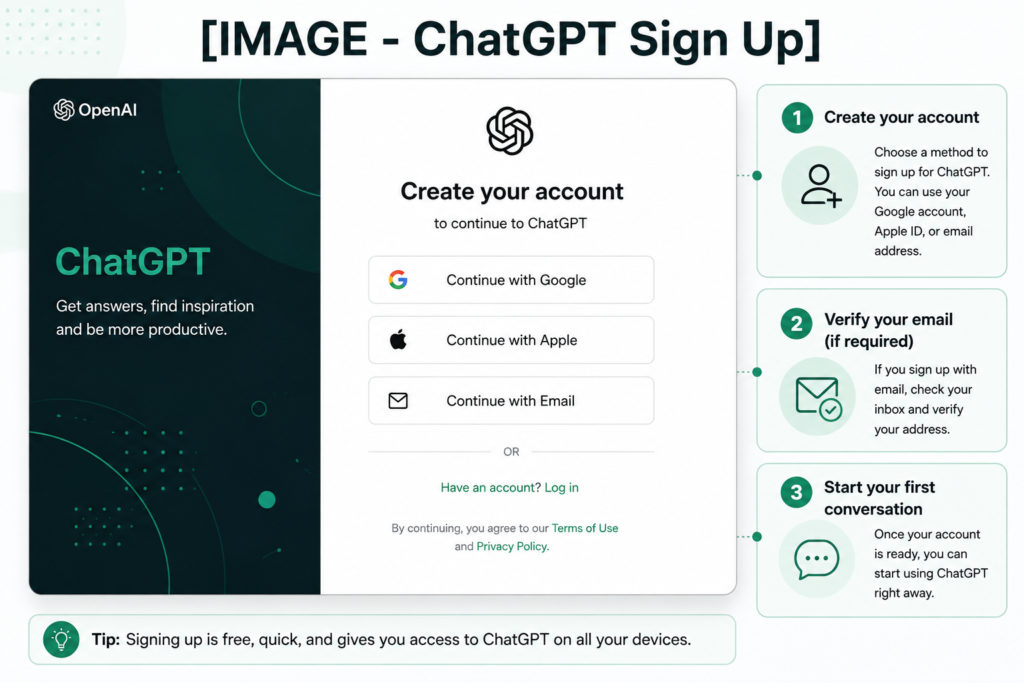
To create an account:
- Visit the official ChatGPT website.
- Click Sign Up.
- Continue using your email address, Google account, Apple account, or another available sign-in method.
- Complete the verification process if required.
- Once you’re logged in, you’ll be taken directly to the ChatGPT interface.
After creating your account, you can immediately start a new conversation and ask your first question.
If you’re new to AI, don’t worry. There is no complicated setup required.
Understanding the ChatGPT Interface to Use ChatGPT Better
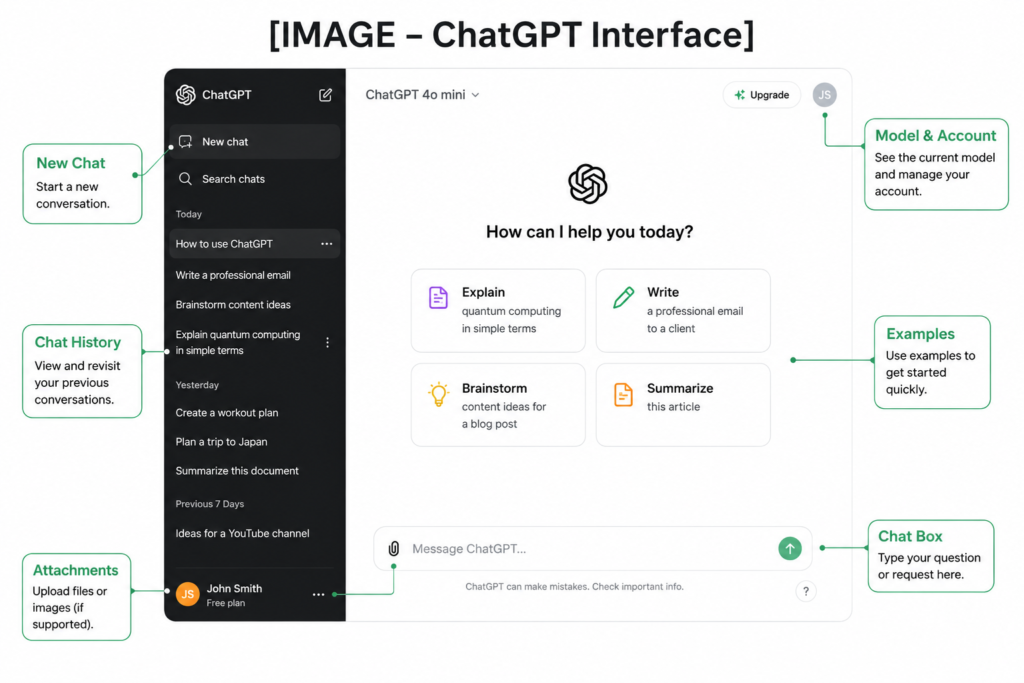
After signing in, you’ll see the ChatGPT home screen. Although the interface is simple, understanding its main features will help you use the platform more efficiently.
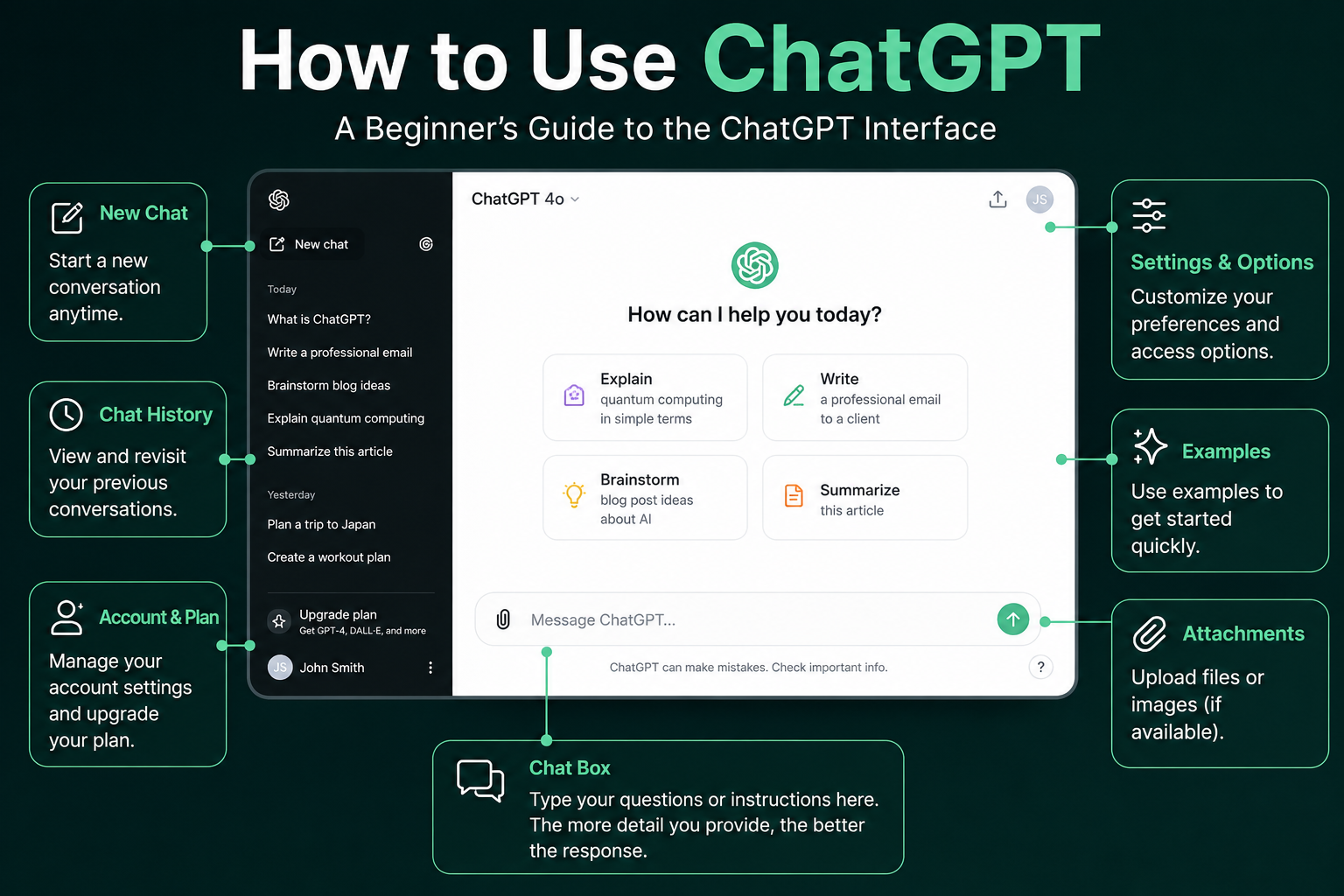
Here are the key areas you’ll interact with:
- Chat box: Type your questions, requests, or prompts here.
- New Chat: Start a fresh conversation whenever you want to switch topics.
- Conversation History: Access your previous chats from the sidebar.
- Attachments: Depending on your plan and available features, you may be able to upload files or images for ChatGPT to analyze.
- Settings: Manage your account preferences, appearance, and other available options.
The interface is designed to feel like a conversation. Simply type your request, press Enter, and ChatGPT will generate a response within seconds.
How to Write Better Prompts
One of the biggest reasons people feel disappointed with ChatGPT is not because the AI is bad—it’s because the prompt isn’t specific enough.
A prompt is simply the instruction you give to ChatGPT.
The more context and details you provide, the better the response is likely to be.
For example, instead of writing:
Write an email.
Try something like:
Write a polite follow-up email to a client after a business meeting. Keep it under 150 words and maintain a professional tone.
The second prompt gives ChatGPT a clear goal, context, audience, tone, and length. As a result, the response is much more useful.
Tips for Writing Better Prompts

To get better results from ChatGPT, follow these simple tips:

- Be specific about what you need.
- Provide enough context.
- Mention the desired tone (formal, casual, friendly, professional, etc.).
- Specify the format if necessary (table, list, email, summary, code).
- Ask follow-up questions if the first answer isn't exactly what you need.

Remember, ChatGPT works best when your instructions are clear and detailed.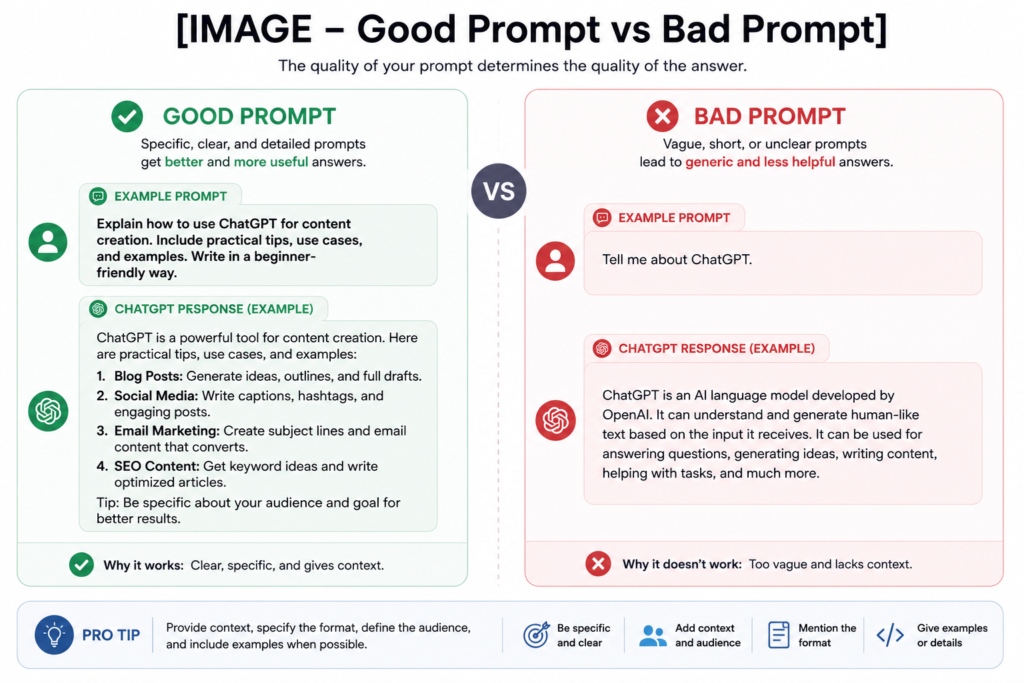
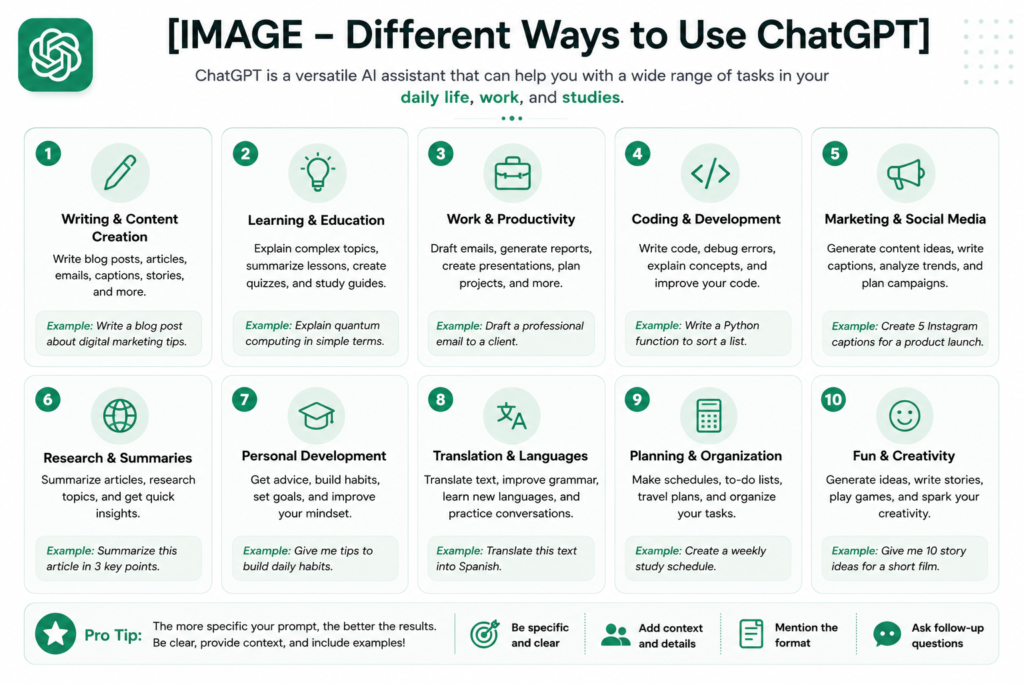
What Can You Use ChatGPT For?ChatGPT is incredibly versatile. Whether you’re studying, working, running a business, or simply trying to save time, it can help with a wide range of everyday tasks.
Here are some of the most common ways people use ChatGPT:
Writing and Editing

ChatGPT can help you write emails, blog posts, social media captions, reports, resumes, and cover letters. It can also improve grammar, rewrite sentences for clarity, or adjust the tone of your writing.
Example:
Rewrite this email to sound more professional but still friendly.
Learning New SkillsMany people use ChatGPT as a personal tutor. It can explain complex topics in simple language, create study plans, answer questions, and generate quizzes to help you learn faster.
Whether you’re learning programming, mathematics, history, or a new language, ChatGPT can provide step-by-step explanations.
Programming and Coding
Developers use ChatGPT to understand code, debug errors, write scripts, explain programming concepts, and generate simple examples in various programming languages.
While ChatGPT is a valuable coding assistant, it’s still important to review and test any code before using it in a real project.
Productivity and WorkChatGPT can save time by helping you organize information, summarize long documents, brainstorm ideas, create meeting agendas, and build to-do lists.
Many professionals use it as a productivity assistant to complete repetitive tasks more efficiently.
Practical Prompt Examples
Example 1: Writing an Email
Instead of asking:
Write an email.
Try:
Write a professional follow-up email after a job interview. Keep it under 150 words and express appreciation for the interviewer’s time.
Example 2: Learning
Instead of asking:
Explain photosynthesis.
Try:
Explain photosynthesis as if you were teaching a 12-year-old student. Use simple language and provide one real-world example.
Example 3: Brainstorming
Instead of asking:
Give me business ideas.
Try:
Suggest 10 online business ideas that require less than $500 to start and can be managed by one person.
Example 4: Content CreationInstead of asking:
Write a blog post.
Try:
Write a beginner-friendly blog post about indoor plants. Include headings, practical tips, and a friendly tone.
Common Mistakes Beginners Make
Even though ChatGPT is easy to use, many beginners make the same mistakes. Avoiding these common issues will help you get better results from the start.
1. Asking Questions That Are Too Vague
A prompt like:
Tell me about marketing.
is too broad.
Instead, try:
Explain digital marketing for a beginner who wants to start an online business.
The more specific your request, the more useful the answer will be.
2. Expecting Perfect Answers Every Time
ChatGPT is a powerful AI assistant, but it can occasionally misunderstand your request or provide incomplete information.
If the answer isn’t exactly what you need, ask follow-up questions or provide more context instead of starting over.
3. Trusting Every Answer Without Verification
While ChatGPT is very helpful, it can still make mistakes.
Always verify important information such as medical advice, legal guidance, financial decisions, or rapidly changing facts using reliable sources.
4. Giving Up After the First Response
One of the biggest advantages of ChatGPT is that conversations can continue.
You can ask it to explain further, rewrite the answer, simplify the language, or provide additional examples until the result matches your needs.
Tips to Get Better Results
If you want to make the most of ChatGPT, follow these best practices:
- Be clear and specific.
- Give enough background information.
- Explain who the audience is.
- Mention the desired format.
- Ask follow-up questions.
- Experiment with different prompts.
- Review important information before using it.
Think of ChatGPT as a conversation rather than a search engine. The more details you provide, the more useful the responses become.
Frequently Asked Questions
Is ChatGPT free?
Yes. ChatGPT offers a free plan that allows users to access many of its core features. Paid plans provide additional capabilities, higher usage limits, and access to more advanced models and tools.
Can ChatGPT replace Google Search?
Not completely.
ChatGPT is excellent for explanations, brainstorming, writing, and learning. However, search engines remain better for finding the latest news, live information, official websites, and real-time updates.
Can ChatGPT make mistakes?
Yes.
Although ChatGPT is highly capable, it can occasionally generate incorrect or outdated information. It’s always a good idea to verify important facts using trusted sources.
Do I need coding skills to use ChatGPT?
No.
Anyone can use ChatGPT by typing questions in natural language. No programming experience is required.
Final Thoughts
Learning how to use ChatGPT is one of the most valuable digital skills you can develop today.
Whether you’re writing emails, studying for exams, generating ideas, learning new subjects, or improving productivity, ChatGPT can save time and help you work more efficiently.
The key to success isn’t simply using ChatGPT—it’s learning how to communicate with it effectively.
Start with simple prompts, experiment with different approaches, and don’t be afraid to refine your questions. The more you practice, the better your results will become.
As AI continues to evolve, understanding tools like ChatGPT will become an increasingly valuable skill for students, professionals, and businesses alike.
Now that you understand how to use ChatGPT, the next step is simple: start practicing.
The more you experiment with different prompts, the faster you’ll learn how to use ChatGPT effectively for work, study, creativity, and everyday tasks.
Remember that learning how to use ChatGPT is a skill. Like any skill, it improves with practice.
To learn more about Luminorixa and our mission, visit our About page.
If you have any questions or suggestions, feel free to contact us.